Jada does everything.
You make the calls.
HeyJada runs your automations end to end — research, drafts, spreadsheets, outreach — then pauses at the one moment that matters: the final decision. One tap to approve, from the web or straight from Telegram.
$14.95/month after your trial · cancel anytime

The industry is racing to take humans out of the loop. We built the entire product around keeping you in it.
Full autonomy sounds great until an AI invites the wrong people to your party or emails a client something you never read. HeyJada's bet: the best automation does 99% of the work — and treats the last 1%, the decision, as sacred. Yours.
Work flows. Decisions pause. You tap. It finishes.
Not a confirmation dialog.
A decision-making experience.
Most tools bolt on an "Are you sure?" popup and call it oversight. HeyJada treats your judgment as the core feature — and builds everything around making great decisions in seconds.
Flip one toggle. Nothing final happens without you.
Mark any automation "requires approval" and Jada does all the work — then stops right before the point of no return. The email doesn't send. The post doesn't publish. The charge doesn't process. Until you say so.
- Runs pause safely — for a minute or for three days
- Everything lands in one Approval Inbox with a live count
- Didn't respond in 72 hours? It cancels safely. Nothing fires on its own.

Decide from the data, not a summary.
Every approval comes with the actual evidence: the guest list, the email rendered exactly as it will send, what changed since the last run you approved. Jada even flags her own doubts — "it's the first year clients are on this list, so I wanted you to see it first."
- Live data tables with copy and CSV export
- Diffs against your last approved run
- The agent discloses anomalies instead of hiding them
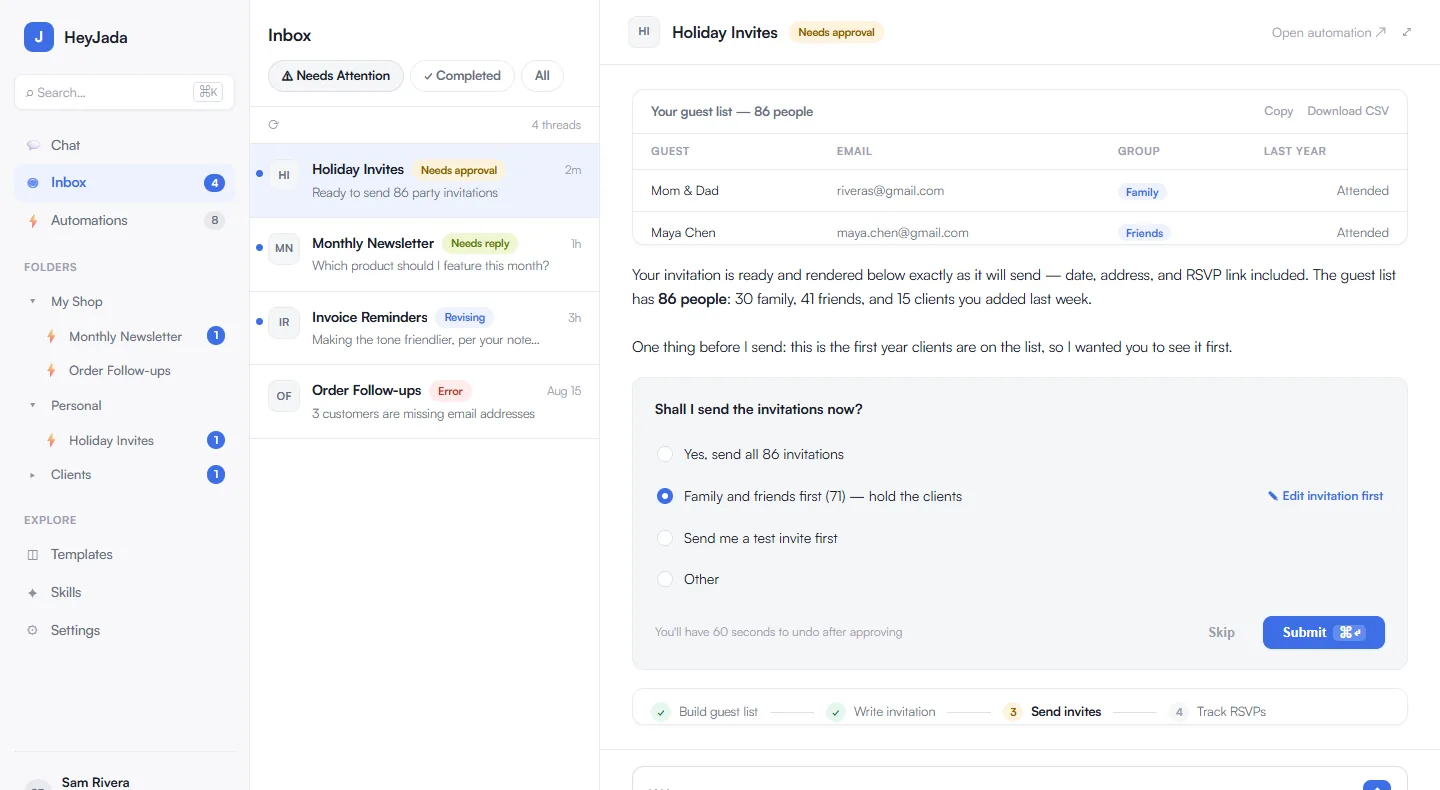
"Approve" is the floor, not the ceiling.
Jada proposes real options, scoped to the situation — all 86 guests, family and friends first, or a test invite to yourself. Want changes? Edit the email right in the preview and approve your version in one step. Or just type what you want different and she revises.
- Scoped choices generated for each run
- Edit-and-approve: fix it yourself, ship in one tap
- Approve just some — check the rows you want, skip the rest
- Reply in plain English — "family first, and add 'kids welcome'" — and she gets it
Shall I send the 86 party invitations now?
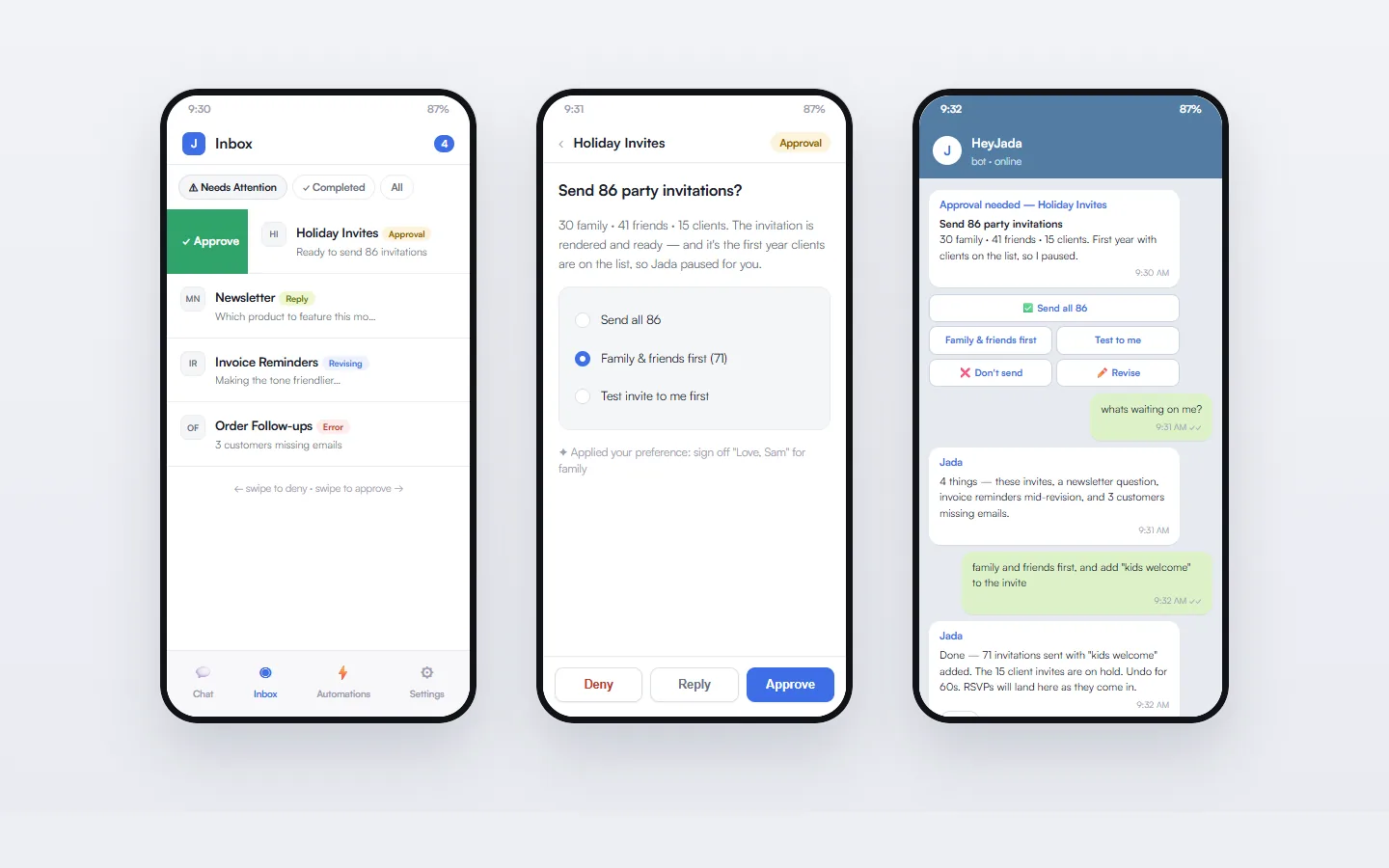
Approve from Telegram. 👍 means go.
Every approval reaches you in Telegram with the evidence attached. Thumbs-up approves. Thumbs-down denies. Reply to the message and your words become revision instructions. You can also just talk to Jada there — she knows everything in your inbox and can run anything you ask.
- 👍 approve · 👎 deny · reply to revise
- Ask "what's waiting on me?" and get the full picture
- Create and trigger automations from chat
- Receipts land in the same thread when the work completes

She learns your judgment — and earns autonomy.
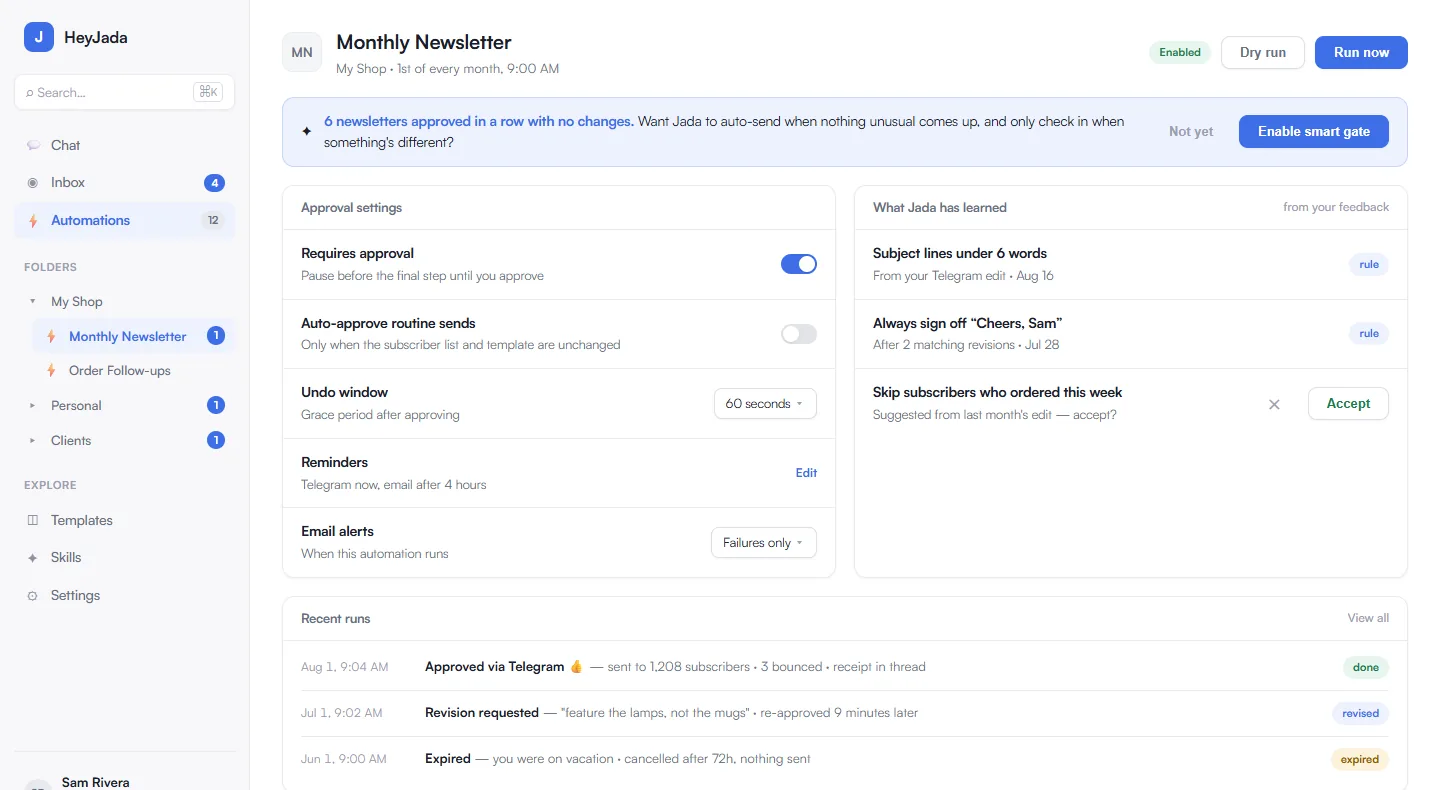
Every revision you request becomes a rule Jada applies next time, and shows you she applied. After a dozen clean approvals she'll offer to auto-approve the routine runs and only interrupt you for the unusual ones. One deny, and she goes right back to asking first.
- Feedback becomes permanent rules — visibly applied
- Earned auto-approval under limits you set
- Canary batches, 60-second undo, receipts on everything
- A full audit trail of who approved what, where, and when


99% automated. 100% yours.
Every stream pauses at exactly one place — you.Three steps. One of them is yours.
Tell Jada what you want done
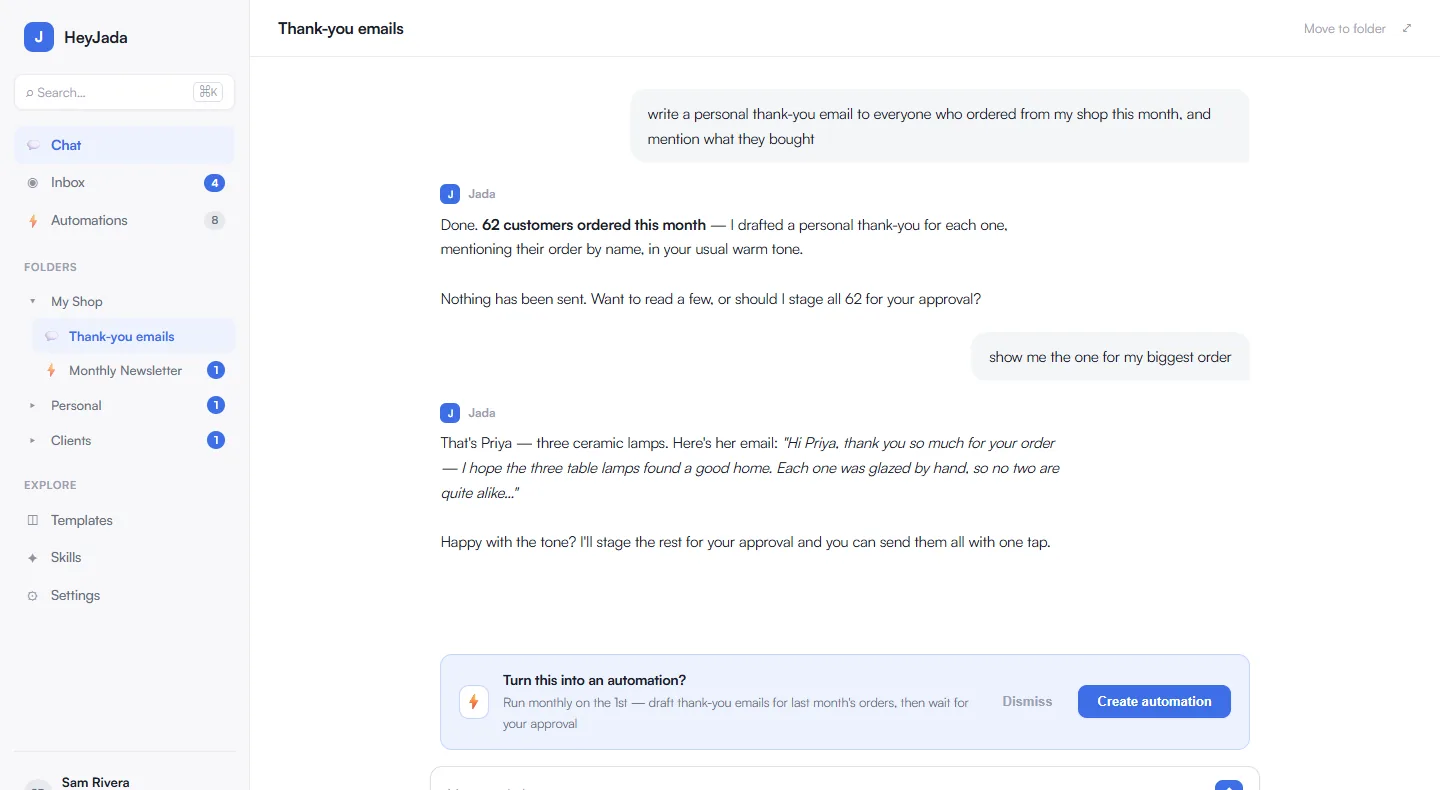
Describe it in plain English — in the web app or Telegram. Chat once, or make it a scheduled automation. Jada even suggests automations from your conversations.
Jada does the work
She pulls the data, writes the drafts, builds the sheet, preps the outreach — every step, end to end, on schedule or on demand. Organized in folders, with full run history.
You make the call
Jada pauses at the final step with the evidence and real options. Approve, adjust, or deny — from the inbox or with a 👍 in Telegram. Then she finishes and sends you the receipt.
Real screens from HeyJada.
A complete automation platform underneath.
The approval experience is the star. The supporting cast is all here.
The Approval Inbox
One place for everything needing you: approvals, questions from mid-run, errors, and a clean record of everything completed — with live counts and keyboard-speed triage.
Telegram, first-class
Chat, approve, create automations, get receipts — full parity from your pocket.
Folders & sub-folders
Organize by project, client, or company. Jada files things for you.
Chat-to-automation
Did something useful in a chat? One tap makes it a scheduled automation.
Alerts your way
Email on every run or only on failures. A morning digest of what's waiting.
Safety nets everywhere
Dry-run mode, test batches, 60-second undo, kill switches, and automatic expiry — nothing runs away from you. Every action leaves a receipt in the audit trail.
One plan. Everything included.
Try everything free for 14 days. No tiers, no feature gates, no surprises.
- Unlimited automations & chat sessions
- Human-in-the-loop approvals on anything you choose
- Full Telegram control — approve, revise, create, chat
- Evidence, diffs, receipts & audit trail
- Folders, templates, run history & email alerts
- Learned rules & earned auto-approval
Jada Gets It Done.
Fair questions, straight answers.
Doesn't approving everything defeat the point of automation?
You only gate what deserves gating — it's one toggle per automation. Low-stakes work runs fully autonomously. And for gated work, decisions take seconds because Jada brings the evidence and the options to you. Most users spend under a minute a day deciding, while hours of work happen around them.
What happens if I don't respond to an approval?
Jada nudges you on Telegram, then by email. If you still haven't decided after 72 hours, the run cancels safely — nothing is ever sent, posted, or charged by timeout. Silence means no.
Do I have to use Telegram?
No — everything works in the web app, which is fully mobile-friendly. Telegram is optional, but it's the nicest way to approve on the go, so most people connect it in the first five minutes.
Can Jada ever act without me?
Only where you've explicitly allowed it: automations you leave ungated, or auto-approval limits you've set after she's earned your trust. The moment you deny or revise anything, she reverts to asking first. Every action is in the audit log either way.
What's in the free trial?
Everything. All features, full Telegram access, unlimited automations for 14 days. It's $14.95/month after, and you can cancel anytime.
Let AI do everything.
Except make your decisions.
$14.95/month after trial · cancel anytime · Jada Gets It Done